
Trust Command Centre
Every school's governance, on one screen.
SGAF is the Governance Operating System for UK schools and academy trusts. The Trust Command Centre is its trust tool: an exception grid showing which schools need attention across attendance, safeguarding, finance, governance and workforce, a risk rollup across the estate and a completion grid of who has done what. It reads the work each school already does, so there is nothing new for the schools to enter.
Included on multi-school memberships, with per-school pricing across the estate.
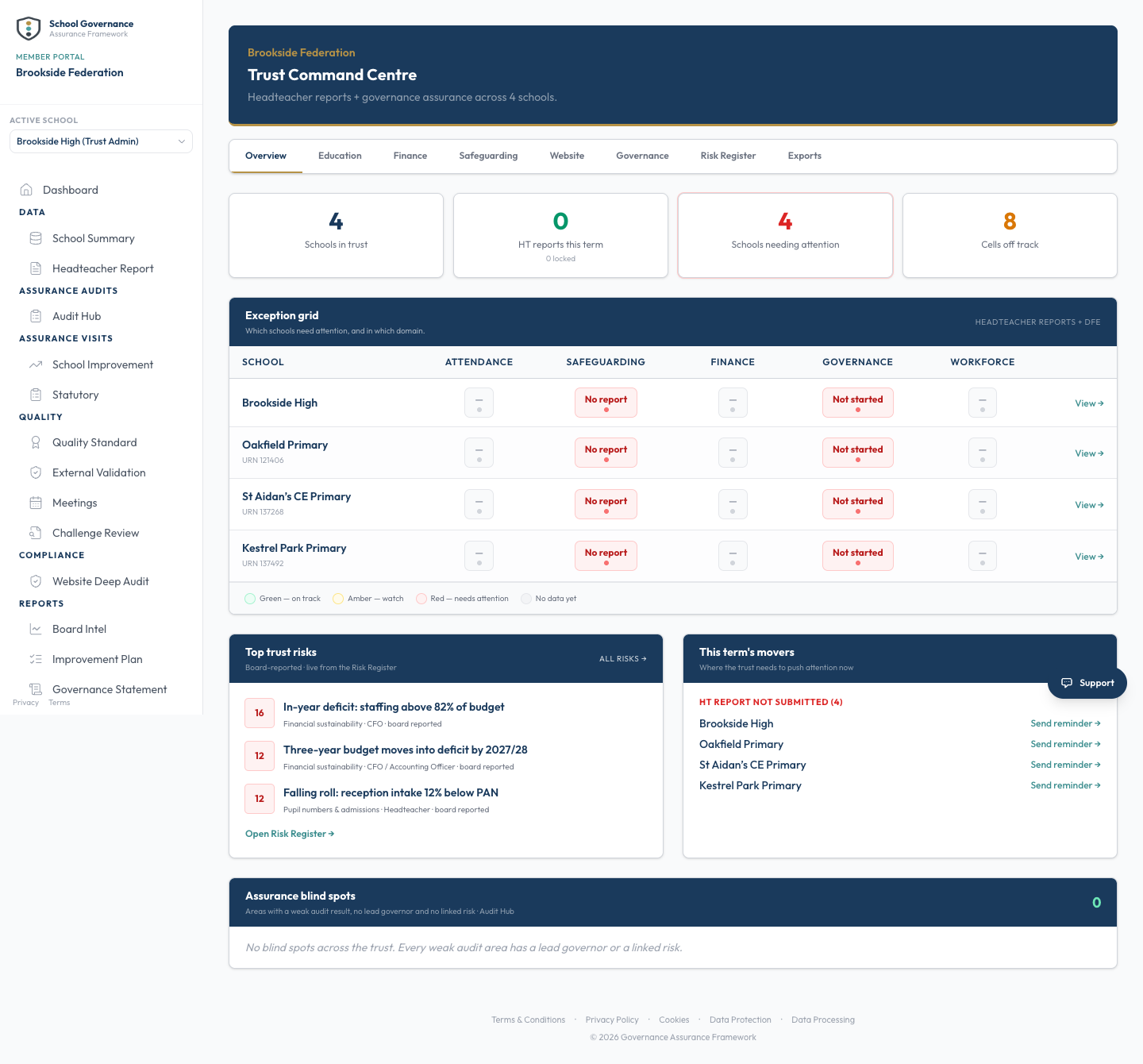
An exception grid across five domains: attendance, safeguarding, finance, governance and workforce
A risk rollup across the whole estate, ready for the trustee pack
A completion grid showing who has done what across every school
Per-school pricing, with central oversight included
How it works
It reads the work. You read the estate.
The Command Centre does not ask the schools to report twice. It draws on the governance each school already does and lifts it into one central view.
Each school does its governance
Audits, risks, actions and termly headteacher reports happen in every school, in the same connected system. Nothing new is created for the trust.
Exceptions surface centrally
The grid shows which schools need attention across the five domains a central board cares about, so the meeting is spent on the schools that need a conversation.
Board papers arrive built
The risk rollup and the completion grid export straight into the trustee pack, so no one rebuilds a table the night before the meeting.
One system across the estate, one live view on top. The oversight is what the central team gains for running its schools on the same platform.
Where it sits in the loop
The oversight layer over every school's loop
Audit findings become risks. Risks become actions. Actions become the annual statement. The Command Centre is where a trust sees all of it, live, across every school.
Audit
Guided checks and the termly website review surface what needs attention.
Risk
Findings become risks, each with an owner and a review date.
Action
Risks become visit plans and actions the board can track.
Statement
The year's evidence becomes the board's annual account.
Oversight (this tool)
Every school's position rolls up into one live view.
One audit programme, one grid
See who has done what, without chasing
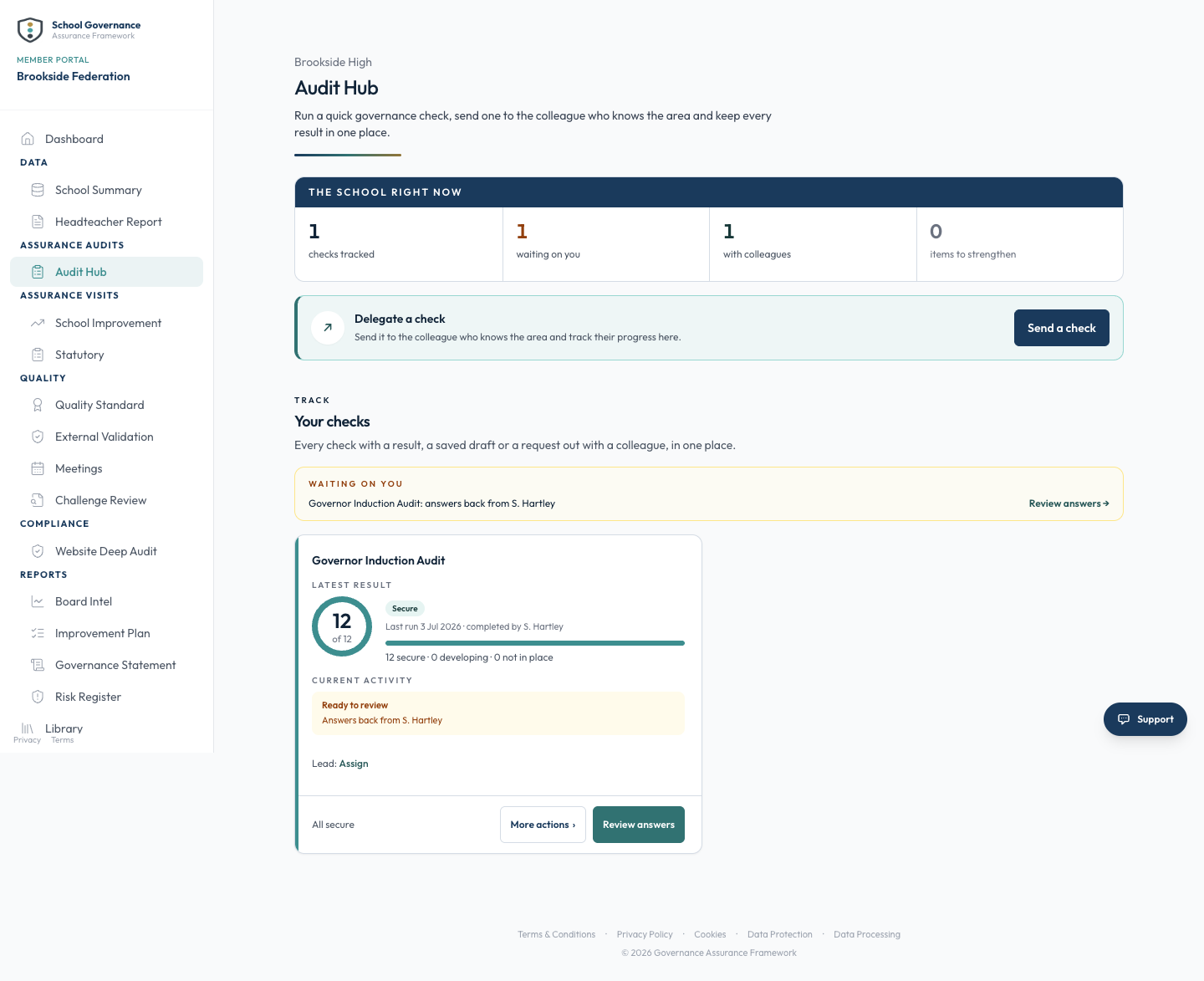
The same checks run in every school, delegated by link with a deadline. The completion grid shows exactly who has completed what across the estate.
Reminders chase the outstanding checks, so the central team does not have to. When a check is done it lands ready to review, and the grid updates for everyone with oversight of the estate.
For the central team
Built for the people who oversee the estate
The same live view, whatever your seat on the trust.
Trust CEO
See every school without chasing for it
- Risks roll up from every school as they change
- Exceptions surface before they escalate
- Termly headteacher reports feed one oversight view
Governance Lead
The same standard in every school you oversee
- One audit programme across the estate
- A completion grid showing who has done what
- Delegation with deadlines and reminders that chase the outstanding ones
Trustee
Board papers that arrive already built
- An estate summary and risk rollup straight into the trustee pack
- The position across five domains at a glance
- Nothing a fortnight out of date by the time you read it
Common questions
What central teams ask
The practical detail before you bring an estate on.
Do our schools have to enter anything new?
No. The Command Centre reads the governance each school already does in the same system, its audits, risks and termly headteacher reports, and lifts that into the central view. No school reports twice.
What are the five domains on the grid?
Attendance, safeguarding, finance, governance and workforce. The exception grid gives each school a status across all five, so the central board can see which schools need attention at a glance.
How is it priced?
Every school pays the standard per-school membership price for its phase, and the Command Centre is included on multi-school memberships. There is no volume discount: the estate-wide oversight is what a central team gains on top. See pricing for the detail.
Where do I see the buyer's case in full?
The for trusts page walks through the exception grid, the risk rollup and how a central team runs its estate on one system. This page is the tool itself.
For central teams
The tool here. The whole case next door.
This page is the Command Centre itself. The trust page is the buyer's story: the exception grid explained in full, the risk rollup and how the estate runs on one connected system.
Per-school pricing across the estate, billed on one invoice. Central oversight is included on multi-school memberships, with no volume discount.
Get started
One twenty-minute call. No commitment.
See every school's governance in one live view, with your own estate in front of you.
Included on multi-school memberships, billed on one invoice, with no volume discount.