
Operating surface
The desk that runs the governance term.
Smart Clerk Desk is where the clerk's day starts: a first-person brief on where the term stands, a ranked view of what needs you this week and a live feed of Department for Education updates so nothing from Westminster lands as a surprise.
Included in SGAF membership, from £229 per school per year.
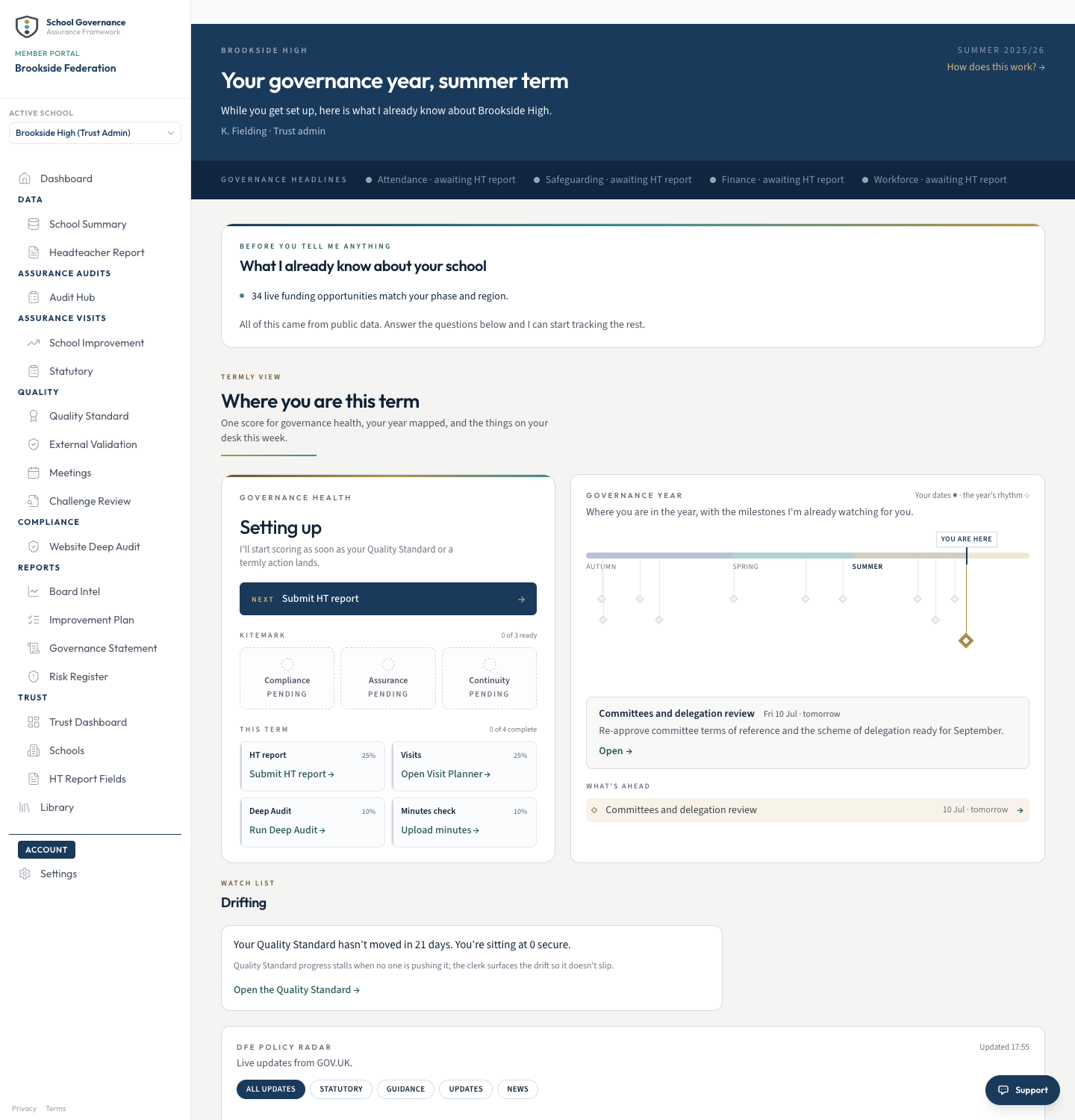
A first-person brief, built from what your school already has on file
Everything that needs you this week, ranked, not buried in a task list
A live DfE update feed, filtered by statutory guidance, updates and news
Built by a governance practitioner, not a software company
How it works
Three things, every time you open the desk
The desk does not wait for you to go looking. It opens already knowing where the term stands.
Open to your brief, not a blank screen
A first-person line on where things stand, plus the day-one facts pulled from public records (your last Ofsted rating, your governor register) before you have typed anything.
See what needs you, ranked
Everything waiting on you this week sits at the top, not buried in a list, and anything that has quietly gone untouched for too long is flagged rather than left to slip.
Watch national policy without going looking
A live feed of Department for Education updates sits on the desk, filtered by statutory guidance, correspondence and news, so nothing arrives as a surprise.
Where it sits in the loop
Not one stage. The surface underneath all of them
Smart Clerk Desk is not one stage of the assurance loop. It is the operating surface the clerk works from, so every stage is one click away without leaving the morning view.
Audit
Guided checks and the termly website review surface what needs attention.
Risk
Findings become risks, each with an owner and a review date.
Action
Risks become visit plans and actions the board can track.
Statement
The year's evidence becomes the board's annual account.
Oversight
Every school's position rolls up into one live view.
Real UI
The term in view, not just today
This is one school's actual desk, not a demo built for the site.
- The governance year laid out, with what's ahead flagged against real dates
- A quiet flag when something has sat untouched too long, such as a stalled Quality Standard
- The DfE Policy Radar, filtered to statutory guidance, updates and news
- Everything pulled from what the school already has on file, nothing re-typed
For every seat
Built around the clerk's week, useful to the whole board
One surface, read differently depending on the job you do.
Clerk
Your first stop every morning
The term's brief, the queue and the policy radar, all from one login. Nothing to assemble before you can see where things stand.
Chair
Confidence nothing is slipping
Knowing the clerk's desk is ranking what needs attention means the chair is not the one holding the whole term in their head.
Headteacher
Governance keeps moving without chasing
The clerk's queue keeps the governance side of the term on track, so the head is not the one prompting the next statutory deadline.
Governor
A board that runs on time
Papers, agendas and reminders land when they should, because the desk is tracking the term for the person who runs it.
Overseeing several schools? Every school's desk rolls up to one live view. See governance for trusts →
Common questions
How Smart Clerk Desk works
The practical detail before you book a walkthrough.
Who actually sees the desk?
It is built around whoever runs the paperwork side of governance, usually the clerk. Other governors see the Boardroom Dashboard, the board's shared summary view of the same system.
Where does the DfE Policy Radar come from?
Straight from GOV.UK, filtered to the Department for Education and organised into statutory guidance, wider guidance, correspondence and news, so you can scan for what matters to your board.
Does this replace the Boardroom Dashboard?
No. They are two views of the same system: the desk for the person doing the day-to-day work, the dashboard for the board's shared position at a glance.
Do we need to set anything up before it is useful?
No. The day-one facts on the brief are pulled from public records such as Ofsted and the governor register before you have entered anything, so there is something real to look at from the first login.
What happens when there is genuinely nothing to do?
The desk says so plainly rather than inventing busywork: a clear line telling you nothing needs you today.
Not ready to talk? See where your board stands first.
Run a free check →Get started
One twenty-minute call. No commitment.
See your own school's day-one brief before you decide.